Hop Rush 3D
New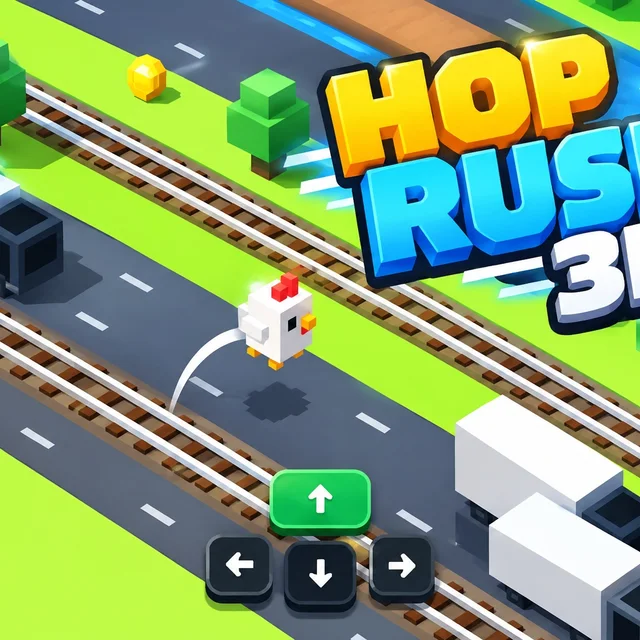
- Genre Arcade games
- Players 1
- Session 5 min
- Price Free
- Updated
Hop Rush 3D drops a small white voxel chicken called Clucky Chicken onto a diagonal strip of green grass and asks for one thing: keep going up the screen. Ahead lie grey asphalt lanes with yellow taxis and long white box trucks, railway tracks, and a bright blue river, all drawn in chunky cube shapes seen from an angled camera. Trees sit on the grass rows as solid blocks you have to step around.
Movement is tile by tile, never continuous. A tap of an arrow key or W, A, S or D makes the chicken hop exactly one square, so every press is a small decision. On a phone you can swipe or press the four arrow buttons drawn at the bottom of the screen, with the up arrow coloured green because that is the one you will use most. The counter in the top-left corner climbs by one for each new row you reach and keeps your best run underneath, while a coin tally sits in the top-right next to the sound, music and pause buttons.
The danger changes from row to row. Cars and trucks roll through at their own lane speed, which means you can read the gaps and step in behind a vehicle that has just passed. The rails are less forgiving: trains cross fast, and a hop onto the tracks at the wrong second ends the run on the spot. Standing still for too long is not a plan either, so the game rewards short pauses and quick commitments rather than waiting on the verge forever.
Between runs the start panel shows your best score and coins, plus two extra buttons. Characters is the shop where coins buy other skins for the hopper, and Missions lists small goals that pay out more coins. A single attempt often lasts under a minute, which makes it easy to restart again and again chasing one more row.
| Arrow keys / WASD | Hop one tile forward, back, left or right |
|---|---|
| Swipe / on-screen arrows | Hop on a touch screen |
| Esc / pause button | Pause the run |
How to play Hop Rush 3D
- Press Play Now on the start panel to place the chicken on the first grass row.
- Tap up (or W) to hop forward one row; each new row adds one point to the score.
- Watch the vehicles in the next lane and hop in right after one passes.
- Treat railway tracks with care and cross only when no train is coming.
- Step left or right to line up with gaps or to walk around trees.
- Collect coins, then spend them under Characters or earn more in Missions.
Tips
- Look two lanes ahead: leave the grass only when the next lane and the one after it both have a gap.
- A sideways hop keeps you on the same row while traffic clears and is often safer than going back.
- On grass rows you are safe from cars, so use them to pause briefly and plan the next crossing.
Questions about Hop Rush 3D
How is the score counted in Hop Rush 3D?
It rises by one for each new row reached; your best result sits under it.
What are coins used for?
Coins buy new characters in the Characters menu; Missions award more coins.
Can I play on a phone or tablet?
Yes. Swipe in the direction you want to hop or use the four on-screen arrow buttons at the bottom of the screen.
What ends a run?
Any hit from a car, truck or train ends it and returns you to the start panel.
How long does a run last?
Usually under a minute, since one bad hop ends it; the restart is instant.
Do I need to install anything?
No, Hop Rush 3D runs in the browser on desktop and mobile.