Red Remover
- Genre Puzzle games
- Players 1
- Session 5 min
- Price Free
- Updated
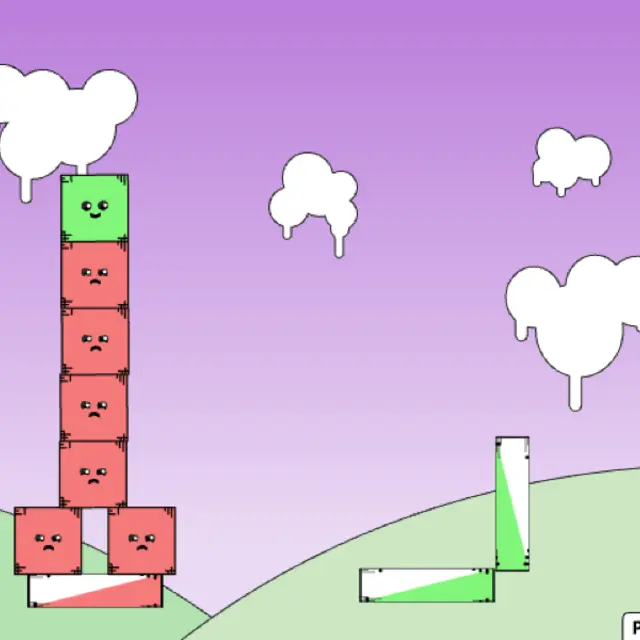
Every shape in Red Remover has a face, and the colour of that face tells you what to do with it. Red shapes frown, and the game wants them gone. Green shapes grin and must still be somewhere on the screen when the last red one disappears. You only have one tool: a click that deletes whatever block it lands on. That sounds trivial until a level stacks a green square on top of three red ones, or props a whole tower on a white plank that has to vanish first. Every removal lets gravity rearrange the pile, so the order of your clicks is the actual puzzle. Gaz, who ran The Game Homepage, released the game in 2009, and it shows its age in the best way: flat pastel colours, wobbly boxes with little worried eyebrows and levels that take a few seconds each once you see the trick. The level select holds 40 numbered stages plus five bonus slots marked with question marks, and there is a built-in editor for making your own layouts.
| Left click a shape | Delete a normal red, white or other clickable block instantly |
|---|---|
| Pause / Reset | Button in the bottom right corner that stops the level or starts it over |
| Main Menu | Return from the level grid to the title screen, where Edit opens the level maker |
How to play Red Remover
- Press Play Game, close the welcome box with ok and choose Play on the title screen.
- Pick level 1 on the grid. Finished stages turn green and the next number unlocks in blue.
- Click every light red block to remove it. White blocks are neutral and can be clicked too, which is often how you make something else fall.
- Dark red blocks are tough and ignore clicks. Knock away whatever holds them so they tumble off the edge of the screen.
- Green blocks must stay on screen. When no red is left and every green is still on screen, a Success banner appears with a Continue button.
Tips
- Look at the faces before you click. A green shape stops smiling when the pile beneath it becomes unstable, which is your warning to stop and think.
- Remove the middle of a row first when greens sit across two red blocks. They slide together into the gap and settle instead of rolling off.
- Clearing a white base under a stack of dark red ones is usually the whole solution: the strong blocks drop out of the level by themselves.
- If a level goes wrong, Pause/Reset is faster than waiting for the pieces to stop moving.
Questions about Red Remover
How many levels does Red Remover have?
The counter in the corner of each stage says 45. The grid shows 40 regular levels and five bonus squares marked with a question mark.
Can I turn the music off?
The welcome box says sound is toggled in the right-click menu, but that menu is switched off in our player. Use your browser tab or system volume to mute it.
Does it work on a phone?
Yes, the whole game is played by clicking blocks, so a tap does the same job. The shapes are big enough for a finger on most phones; a tablet is roomier.
What is the Edit button?
It opens a level maker: drop square or round blocks in four colours, change their width, height and angle, even point gravity sideways or up, then press Play to try your design.