My Cute Pets
- Genre Arcade games
- Players 1
- Session 6 min
- Price Free
- Updated
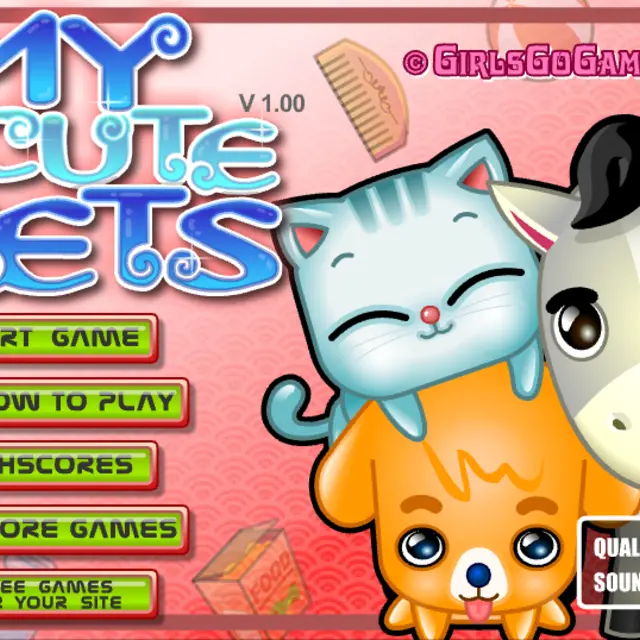
Three animals share the screen in My Cute Pets: a pale blue kitten, an orange puppy and a grey pony with a black mane. Each one keeps asking for something, and your job is to answer before its mood slips. What makes the game more than clicking icons is that every care action has its own mouse gesture. Mopping, washing and petting need the mouse moved left and right; feeding, curing, combing and playing need it moved up and down; a walk means tracing a path along a bar; a drink or a scratching post is handled by simply letting go of the button. Before each round you pick Easy, Normal or Hard and a game length of three or five minutes, and the score at the end goes onto a high-score list. It is a classic Spil Games title with bright, chunky cartoon art.
| Click an icon | Choose a care action for the pet that needs it |
|---|---|
| Mouse left-right | Mop, wash or pet |
| Mouse up-down | Feed, cure, comb or play |
| Drag along the bar | Take the pet for a walk |
| Release button | Give a drink or use the scratching toy |
How to play My Cute Pets
- Click Start Game, then choose Easy, Normal or Hard.
- Pick a round length of three or five minutes.
- Watch the pets for requests and click the matching care icon.
- Perform the gesture shown for that action until the need is met.
- Keep all three animals content until the timer ends to post a good score.
Tips
- Read the How to Play screen once; the gesture groups are easy to remember after that.
- Deal with the most urgent pet first rather than finishing one animal completely.
- Short, fast strokes work better than slow wide ones for the back-and-forth gestures.
- Try a three-minute round on Easy first; once the gestures feel automatic, the five-minute Hard round is where high scores come from.
Questions about My Cute Pets
Which animals are in My Cute Pets?
A kitten, a puppy and a pony, each with its own needs.
How long is a round?
You choose three or five minutes before you start.
What changes between Easy, Normal and Hard?
The setting decides how demanding the round is. Start on Easy while you learn the gestures, then move up.
Does it need a keyboard?
No. Every action is done with the mouse.
Is there a high-score table?
Yes. Your result at the end of a round can be compared on the Highscores screen reached from the main menu.